
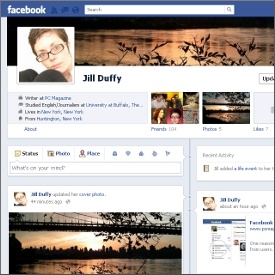

My first impression of Facebook Timeline is that it’s a cross between a visual blog and online scrapbook, at least in theory. In principle, it’s more a rearrangement and different display of the information that’s already in Facebook. It only becomes a scrapbook when you add detailed information that you might not have had before, like your birthday (with year), photos from childhood, and other memories that could fill in the gap between the beginning of your life and the beginning of your life on Facebook.
Overall design. I don’t want to belittle the comment that Timeline is a rearrangement and different display of information, as design very often is a deciding factor between a good Web service and a bad one. Facebook Timeline is designed for activity. The page changes and moves as you scroll. Drop-down tabs at the top and right let you quickly jump to different points in time. The new arrangement emphasizes activity while deemphasizing basic info (“About” information, list of friends, etc.). As before, you have to click through to a new page to see the full information, but now there’s an “About” summary right on the page, decreasing the chances perhaps that you’ll link to the complete information. Likewise, little snapshots and thumbnail images for things like “friends” and “photos” may also satisfy your curiosity without you ever having to leave the Timeline page.
Cover image. Facebook has named the leading image on any Timeline page the “cover image.” It’s a large splash photo that you can change at any time, but is not your profile picture, which I like. You can choose any photo to represent you or your life without it being the picture people see of you. This is a welcomed addition. I get the sense that many people want to make their profile picture some image the captures how they’re feeling or what they’re excited to share at the moment, rather than a picture of their face. I have no problem with creative profile pictures, but there actually is a breakdown in the mechanics of Facebook when you can’t identify your friends by sight; several of Facebook’s authentication procedures require you to identify your friends. I’ve failed them on several occasions by staring blankly at pictures of infants, groups of people on a stage, and cartoon images of dogs.
Idiosyncrasies. The dimensions for the cover image are very unconventional, and I found that I didn’t like how most of my images looked when I uploaded them without manipulating their size and cropping
History. Timeline solves one big Facebook issue: the matter of it being too in-the-moment. As it stands, the news feed generates flutters of sporadic activity all day long, kind of like Twitter. If you’re not logged into Facebook when the activity happens, you might very well miss it. Your experience relies heavily on your timing. Of course, some status updates and activity rises to the top of your news feed based on popularity (another feature I appreciate in Facebook), but there’s still some luck of the draw involved. Say you want to re-read something you remember your friend posted roughly two months ago. Her wall may have been flooded with the most recent activity, whereas her timeline is structured in a way that lets you more easily scan and look for the information you want.
Final Thoughts
I must admit that I liked playing with Facebook Timeline a lot more than I liked filling in standard profile information, but it can also quickly feel overwhelming. With your profile, you only fill in as much as you want. With Timeline, you face a huge swathe of data that you’ve already created, and now you’re tasked with making sure it’s all appropriate and what you want the world to see. If it isn’t, you have exactly seven days to change it. That’s right. You have seven days (or fewer, if you hit the “publish” button sooner) to adjust your Facebook Timeline before it goes live. I like that’s it’s not immediate, but I don’t like that users are forced into it. And there’s no undo. Once Timeline is live, it’s live for good.